Follow meaningful improvements to how Blueprint helps you plan, build, review, and ship. Routine fixes and internal refactors stay out of the feed.
Latest changes
Product history that matters.
Each entry focuses on what changed for developers using the workflow, with direct links into the relevant documentation.
AI Blueprint 1.10.0 adds dashboard dark mode
AI Blueprint 1.10.0 adds a compact sun and moon theme control to the local dashboard, follows the system theme on first use, and remembers an explicit choice across projects.
The local dashboard supports a complete dark palette while preserving its existing project health, roadmap, findings, activity, and Git views.
A compact sun and moon button sits beside the Connected status, with an accessible label that describes the available theme change.
The dashboard follows the operating system theme until you make an explicit choice.
An explicit light or dark preference is saved in the browser for one year and shared by Blueprint dashboards across projects and available local ports.
Loading a dashboard renews a saved preference, while the system default remains unsaved until you use the toggle.
The theme preference stays in the local browser and never changes project files or Blueprint state, requested by @karai17 in issue #22.
AI Blueprint 1.9.0 adds Explore and simplifies commands
Explore ideas against your codebase, set up browser tests through Tests, and get manual walkthroughs through Check, with clearer command help and migration guidance.
Explore compares ideas and tradeoffs against actual code without changing files, executing code, or requiring plans. Brief remains available for existing build-plan features.
Use /tests browser for browser test setup. Default /tests still sets up unit tests; the standalone /browser-tests skill has been removed.
Use /check guide for read-only manual walkthroughs, including latest and scoped guides. Default /check still verifies behavior; the standalone /try skill has been removed.
A task picker and grouped command guide explain when to use each command, including the difference between verification, manual instructions, and code review. Gate defaults remain unchanged.
Terminal help now covers status, dashboard, and update individually, and mistaken AI skill invocations point to the right chat command.
Doctor warns when preserved project instructions lack proportional-engineering guidance, and migration notes explain retired skills, customized files, and unchanged tryGuide configuration keys.
AI Blueprint 1.8.0 adds proportional engineering and adapter changes on update
AI Blueprint 1.8.0 adds a proportional-engineering contract across planning, specs, implementation, and audit, contributed by akash07k, and lets the update command add or remove installed adapters.
AGENTS.md carries a proportional-engineering contract: build for established requirements and reuse existing code, the standard library, native platform features, and installed dependencies before adding machinery.
The project plan worksheet gains an optional section 9, Usage model and constraints, where blank means unknown and unknown never means enterprise, hostile, multi-tenant, or single-user.
Feature adds an abstraction, dependency, service, configuration surface, compatibility layer, or security mechanism to a spec only for a current requirement, so specs are leaner.
Implement runs a proportionality pass before final verification and removes speculative machinery without weakening real trust-boundary validation, data-loss prevention, accessibility, or configured verification.
Audit proportionality findings name what can be deleted, what replaces it, and which current requirement would be lost, and stay at P2 or P3 unless the machinery causes a reachable defect or violates an established security or data-integrity boundary.
Untuned stack-specific template defaults in coding-standards.md are no longer treated as established requirements.
npx create-ai-blueprint@latest update can add or remove adapters: the interactive checkbox is pre-filled with the installed set, and flags such as update -- --codex add an adapter without a prompt and never remove one.
AI Blueprint 1.7.0 adds an optional pre-push hook to CI setup
AI Blueprint 1.7.0 lets CI setup offer a local pre-push hook that runs the same Verify command, and hardens the installer and release checks across platforms.
CI setup ends with one opt-in question, defaulting to no, that adds a local pre-push hook running the exact Verify command before every push.
The hook is wired through core.hooksPath and, for JavaScript and TypeScript projects, a prepare script, and it is run once before it is kept.
git push --no-verify still bypasses the hook, so the GitHub ruleset remains the lock.
The installer rejects a target below a regular file before copying on every platform, instead of failing later with a raw filesystem error.
History archive identifiers use forward slashes on Windows, so status and the dashboard match repository paths.
The publishing workflow pins its npm version, and a Windows CI job now runs the installer test suite alongside Ubuntu Node 22 and Node 24.
AI Blueprint 1.6.1 makes completion and planning more reliable
AI Blueprint 1.6.1 resumes interrupted completion safely, preserves rebuild history, and accepts clear feature lists without a formatting approval pause.
The installer checks destinations before copying and stops on symbolic links or incompatible file types.
Complete resumes interrupted archival, commit, and merge work from archive and Git evidence without duplicating completed steps.
Rebuilds after rollback keep their stable feature ID and receive a separate build attempt, branch, and archive.
Independent review supports ignored local specs with exact snapshots, and existing review/findings evidence alone does not require another code checkpoint.
Overview adds tracking syntax to clear feature lists while preserving wording, order, IDs, and completion state; changes to meaning still need approval.
The simpler build-plan template keeps checklist examples at the end for reference.
Status and the dashboard reflect failed verification and malformed evidence, and suppress completion or resume suggestions that conflict with current readiness.
Commit and PR guidance now covers every tool, with optional Claude Code attribution settings and a correction for the removed Codex setting.
AI Blueprint 1.6 adds automatic independent review and a sharper dashboard
AI Blueprint 1.6 automatically reviews sensitive work in an isolated context when supported and makes the local dashboard easier to follow.
New projects select independent review for sensitive or unusually broad work by default, while ordinary small features continue without the extra review cost.
Automatic execution uses an isolated reviewer when the active adapter can prove fresh context, exact reviewer identity and model, and completion; otherwise Blueprint preserves the request and provides the manual handoff.
Review requests record the requested execution method, and completed receipts record what actually ran.
The dashboard centers the active or next roadmap item when the target changes while preserving manual scrolling during ordinary refreshes.
Active findings now use a sortable F#, P#, Status, and Description table with additive sorting.
Older valid feature specs no longer produce malformed-work warnings, and interrupted valid activity remains resumable without becoming a project-health issue.
AI Blueprint 1.5.4 adds implementation walkthroughs
AI Blueprint 1.5.4 adds an always-available code walkthrough after implementation and makes dashboard state more accurate across completed and older work.
Implement and Autopilot offer a read-only walkthrough of the completed code after the final review packet.
Efficient mode keeps one feature-level review packet, while Guided mode keeps per-step pauses and checkpoint prompts. Both include the same final walkthrough option.
The walkthrough follows the feature steps and explains key files, symbols, control flow, and non-obvious decisions without replacing manual product review through Try.
Completing a feature no longer makes the project overview look stale only because its build-plan checkbox changed.
The dashboard recognizes both current and older feature-spec headers and reports an idle completion gate when no work is active.
CI guidance now distinguishes a passing local Verify run from authoritative clean-checkout proof on GitHub.
AI Blueprint 1.5.2 smooths first-run Git setup
Version 1.5.2 handles projects without an initial commit during Onboard and completes the Blueprint baseline without manual Git recovery.
Onboard detects a repository with no commits before setup work begins.
One reviewed approval creates the scaffold-only root commit, establishes the default branch, returns to the setup branch, and continues onboarding.
Overview can finalize the Blueprint baseline from an unchanged setup branch and fast-forward it into the default branch with one explicit local approval.
Existing projects continue normally whether their first commit contains only the scaffold or already includes Blueprint.
No step pushes automatically, and the standard Quick Start remains unchanged.
AI Blueprint 1.5.1 hardens dashboard activity state
Version 1.5.1 prevents malformed workflow activity updates and gives Doctor a narrow recovery path for existing invalid dashboard state.
Tracked workflow commands now use a packaged helper that validates the complete activity record before atomically replacing blueprint/.state/run.json.
An invalid activity update preserves the previous valid dashboard state instead of replacing it with malformed data.
Doctor detects malformed existing activity and can reset only the generated run.json record after user approval.
Overview documentation now clarifies that the command runs initially and after material plan changes, not before or after every feature.
AI Blueprint 1.5.0 loads workflow context on demand
Version 1.5.0 gives Claude a smaller startup context while Feature and Implement inspect less by default without weakening planning safety.
New Claude Code installs import only AGENTS.md at startup. Explicit skills load the overview, active spec, standards, and interaction guide when needed.
Feature reads targeted project evidence, critiques contracts before one final spec write, and stops instead of inventing material product or security choices.
Implement treats the approved spec as its work packet, uses focused checks while building, and normally runs the full Verify command once after all steps.
New specs record their exact work branch, and Implement retains a deterministic fallback for specs written by older versions.
Required logic-test and UI-evidence settings remain hard gates even with the shorter implementation loop.
Existing Claude projects keep their CLAUDE.md. The updater names every obsolete direct context import to remove and instructs users to restart Claude Code.
AI Blueprint 1.4.1 keeps Claude Code context compact
AI Blueprint 1.4.1 responds to a real-world context report with a compact-overview limit, clearer diagnostics, and substantially lower usage in a controlled Claude Opus 5 reproduction.
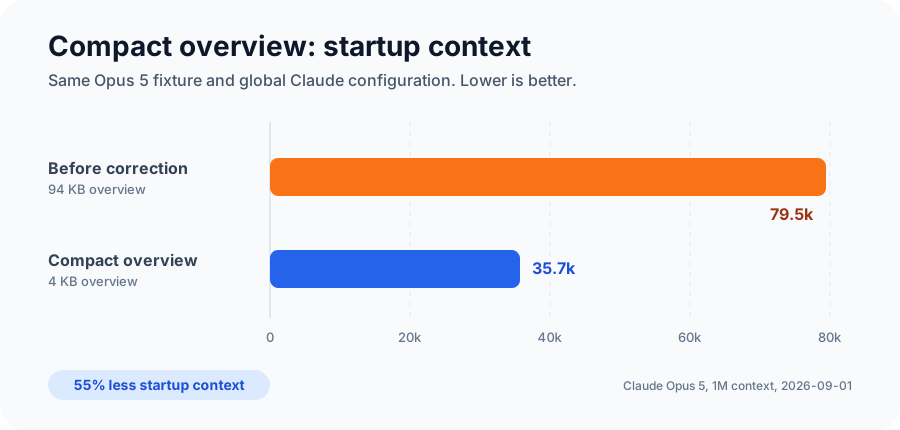
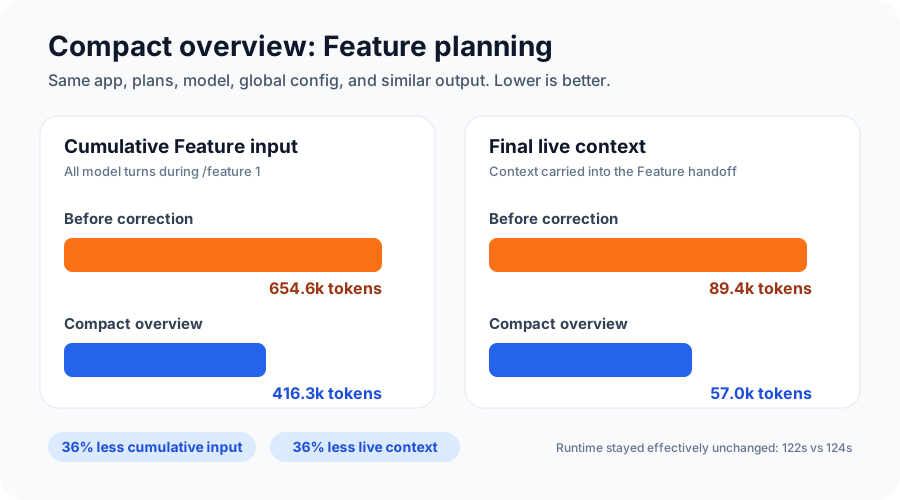
Startup input fell 55.1% after Overview compacted the same project's 94KB overview to 4KB.Cumulative Feature input and final live context both fell about 36%, while runtime and output stayed effectively unchanged.
AI Blueprint 1.4.1 keeps generated project overviews below 20,000 bytes while preserving project instructions, concrete contracts, build order, and constraints.
A user found that project-overview.md alone used 33.8k tokens and a fresh Feature session reached 162.9k. That exposed a case our first 1.4 benchmark did not represent well.
We rebuilt the test around the same failure shape: a 94,441-byte overview, the same small app and plans, Claude Opus 5, and the same global Claude configuration.
Regenerating the same plans as a 4,087-byte overview reduced startup input from 79,479 to 35,688 tokens, a 55.1% reduction.
Cumulative Feature input fell from 654,550 to 416,302 tokens, while final live context fell from 89,352 to 57,034 tokens.
Feature output stayed nearly identical and runtime changed from 122 to 124 seconds, so the smaller context did not produce an obvious quality or speed tradeoff in this fixture.
Overview now keeps generated project context below 20,000 bytes. Doctor flags an oversized overview, and Feature stops before loading one.
Feature also reuses the overview Claude Code already loaded instead of reading the same file again with a tool.
Claude Code still starts with the core project instructions, compact overview, and active spec, so normal project awareness is preserved.
A second end-to-end run through the repository's actual sandbox generated a 3,524-byte overview and landed within 2.4% of the charted compact Feature totals.
The user's exact 162.9k result was not reproduced. These numbers come from one controlled fixture, not a universal savings guarantee.
Planning baseline commits ship in 1.3.0
AI Blueprint 1.3.0 can preserve the approved initial setup and plans in one reviewed local commit before Feature 1 begins.
Install or update to create-ai-blueprint 1.3.0 to use the initial planning baseline handoff.
Run Overview after completing the project plan and build plan.
Review the exact Blueprint-only candidate diff before approving the local baseline commit.
Keep the app scaffold, unrelated application work, generated state, secrets, logs, and caches out of the commit.
Skip the offer automatically for local-only installations and after feature work has begun.
Continue to Feature 1 from a clean planning checkpoint without any automatic push.
Independent review ships in 1.2.0
AI Blueprint 1.2.0 can hand a verified checkpoint to a selected fresh reviewer session and block completion when its evidence is missing or stale.
Install or update to create-ai-blueprint 1.2.0 to use independent review in a project.
Run audit independent current from the builder session to select an installed adapter and available model.
Review the complete checkpoint from a fresh session across quality, security, performance, and tests.
Record the target, base, spec hash, reviewer identity, Check result, commands, evidence, findings, and remaining risk.
Reject receipts after relevant code, test, configuration, spec, base, adapter, or selected-model drift.
Keep the gate manual by default, or enable it for sensitive work or every work item in regular and Continuous workflows.
AI Blueprint 1.1 adds optional browser testing setup
Version 1.1 adds a project-owned browser harness that Feature, Implement, Check, and Continuous Mode can reuse.
Run browser-tests explicitly to reuse an existing browser runner or default to Playwright for compatible JavaScript and TypeScript web or extension projects.
Record one exact Browser tests command in AGENTS.md and prove it with a small smoke flow.
Let Feature and Implement add focused coverage, then let Check and Continuous Mode run the same project-owned harness.
Keep browser tooling out of the default install, Verify recipe, and GitHub Actions unless the project deliberately opts in.
Preserve direct browser checks for visual fidelity, authenticated real-profile behavior, browser chrome, and other claims automation does not cover.
AI Blueprint 1.0 establishes the stable workflow baseline
Version 1.0 brings the redesigned live dashboard, command activity tracking, hardened rollback and completion safeguards, and smoother local maintenance.
See the next action, current work, roadmap, project state, findings, completion readiness, and history in a redesigned local dashboard.
Follow active and completed Blueprint commands through live mode, gate, progress, resume, and recovery state.
Get immediate dashboard refreshes as Blueprint files, project files, or Git state change.
Stop ambiguous merge-commit rollbacks during planning, before Blueprint writes a runnable rollback spec.
Keep every repaired finding in the ledger until a later audit re-reviews it, while preserving the existing P0 and P1 completion gate.
Use the improved local-checkout workflow and cross-platform installer fixes contributed by @akash07k.
AI Blueprint 0.14.0 adds project configuration and Continuous Mode
Version 0.14.0 adds shared workflow configuration and an explicit local loop for completing the remaining build plan one feature at a time.
Configure review cadence, checkpoint commits, branch prefixes, verification, quality gates, and Continuous limits in `blueprint/config.json`.
Run `/continuous` or `$continuous` to process planned features serially with local branches, verification, archives, and one local main commit per feature.
Treat Continuous as execution of a reviewed plan, not permission for open-ended vibe coding. It stays local and still honors configured review and quality gates.
Keep audit, check, and try-guide automation manual by default, with separate policies for regular and Continuous work.
See all four supported tools named accurately when onboarding recommends which shared adapter trees to keep.
AI Blueprint 0.13.0 adds OpenCode and multi-adapter setup
Version 0.13.0 adds OpenCode support, a checkbox installer for choosing multiple AI tools, and an explicit workflow visibility choice for existing codebases.
Select one or more adapters from an interactive checkbox list, with all four supported tools selected by default.
Combine `--codex`, `--claude`, `--copilot`, and `--opencode` flags for scripted installs.
Let OpenCode reuse compatible `.agents/skills/` or `.claude/skills/` files without creating a duplicate skill tree.
Choose whether `/adopt` commits Blueprint workflow files or keeps them local, contributed by @sushantrahate.
A clearer AI Blueprint dashboard and CLI
The latest dashboard updates make project status easier to scan and give the browser view a clearer command name.
See exact workflow warnings under Project Health instead of an unexplained warning badge.
Distinguish the current build-plan item from the next planned item.
Read clean or changed Git state directly from the status badge.
Scan active work before completed history in a balanced desktop and mobile layout.
Use improved headings, contrast, keyboard scrolling, progress semantics, and reduced-motion behavior.
Run `blueprint dashboard` as the canonical command while the older `blueprint ui` form remains available as a deprecated alias.
Use the dashboard through npx without installing the optional global CLI.
AI Blueprint 0.11.0 adds a live local dashboard
Version 0.11.0 adds a read-only browser dashboard for the Blueprint roadmap, active work, completed history, findings, Git state, and next action.
Run `blueprint ui` from a Blueprint project to open the live local dashboard.
Follow the full build plan, current build steps, completed work, findings, completion blockers, and next command in one view.
Keep project data local through a loopback-only server that stops with the CLI process.
Install or refresh an outdated global CLI from the normal interactive install or update flow. Matching versions skip the prompt.
AI Blueprint 0.10.0 adds GitHub Copilot support
Version 0.10.0 adds GitHub Copilot as an explicit adapter and makes all three supported adapters the default installer choice.
Choose Codex, Claude Code, GitHub Copilot, or all three during installation.
Install only GitHub Copilot support with `--copilot`.
Use `--all` for every supported adapter. The older `--both` option remains as a deprecated alias.
Share the same `.agents/skills/` adapter files between Codex and GitHub Copilot.
AI Blueprint 0.9.1 separates status from install and update
Version 0.9.1 makes the optional global blueprint command status-only while keeping file-changing operations under the version-explicit package command.
Run `blueprint status` for a short, read-only project status command.
Install Blueprint with `npx create-ai-blueprint@latest`.
Update managed files with `npx create-ai-blueprint@latest update`.
Unsupported global operations direct you to the correct package command.
AI Blueprint 0.9.0 adds a project status CLI
Version 0.9.0 adds read-only terminal status, versioned JSON output, and an optional global blueprint command.
Run `npx create-ai-blueprint@latest status` from a Blueprint project or any nested directory.
Read build-plan progress, active work, findings, Git state, drift warnings, completion blockers, and one suggested next action.
Use `status --json` for a versioned object suitable for scripts and local integrations.
Interactive installs can optionally install the exact package version globally, exposing the shorter `blueprint status` command.
The global prompt defaults to no and never interrupts automated or `--yes` installs.
AI Blueprint 0.7.0 is now available
Version 0.7.0 adds read-only Debug, focused Audit lenses, optional Discovery, and stronger maintainer evaluations without changing the existing install or update flow.
The install command remains `npx create-ai-blueprint@latest`, and existing installations continue to update through `npx create-ai-blueprint@latest update`.
Debug reproduces and isolates failures without editing code or Blueprint state.
Audit can focus independently on quality, security, performance, or tests.
Discovery offers an optional deep planning conversation while preserving direct plan writing and the existing workflow.
Deterministic routing checks and risk-gated live-agent scenarios strengthen release confidence without shipping maintainer tests into user projects.
The public repository now lives under the AI Blueprint GitHub organization, while links to the previous location continue to redirect.
Deep project discovery is now optional
The new `/discovery` skill can develop detailed Blueprint plans through a long, adaptive conversation without changing the existing direct planning workflow.
Discovery asks one focused question at a time, follows consequential answers, and periodically summarizes confirmed decisions, assumptions, open questions, and deferred ideas.
There is no fixed question count. The conversation continues until the project is clear enough to draft and the user says they are ready.
The skill first shows complete drafts, keeps the project plan detailed and the build plan trackable, and writes only after explicit approval.
Existing plans are preserved, and Discovery never scaffolds, edits product code, generates the overview, commits, merges, pushes, or deploys.
The direct path is unchanged. Users can write plans manually or through any AI conversation and continue straight to `/overview` without ever running Discovery.
Routing, installer, and repository checks passed, and the live-agent boundary scenario passed all 11 checks in a scratch project.
Discovery shipped in `create-ai-blueprint@0.7.0` and remains fully optional.
Focused diagnosis and code audits
The new `/debug` skill investigates failures before code changes, while `/audit` can now focus on quality, security, performance, or tests.
Debug starts with the smallest safe reproduction, traces the failure through nearby code and configuration, and separates the visible symptom from the underlying cause.
Every diagnosis ends as confirmed, likely, or blocked, with evidence, remaining uncertainty, and a recommended next action.
The skill is strictly read-only. It does not edit source, tests, configuration, lockfiles, Blueprint state, branches, or commits.
Confirmed failures return to `/implement` when active work caused them, or move to `/fix` when they are standalone bugs.
Audit scopes and lenses are separate, so commands such as `/audit security current` and `/audit tests src/auth` stay focused without losing branch-aware coverage.
Debug and the focused audit lenses shipped together in `create-ai-blueprint@0.7.0`.
Blueprint skills now have behavior evaluations
Maintainer validation now checks skill routing and exercises critical workflow boundaries with real agents before releases, without adding test files to installed projects.
Every Blueprint skill now has realistic positive and negative routing prompts that catch missing trigger language and collisions with neighboring skills.
Live Claude scenarios exercise the review gate for Feature, the read-only boundary for Check, the merge boundary for Autopilot, safe Rollback planning, and the existing Findings and Complete gates.
Deterministic routing evaluations run automatically with the repository gate, while token-spending live-agent scenarios remain explicit, maintainer-only checks.
Package smoke tests confirm the evaluation cases, runners, and scratch projects stay out of the published installer.
Shared local and GitHub verification
Blueprint now gives local agent work and GitHub Actions one project-specific Verify command through the optional `/ci` setup.
The CI skill detects the real stack, package manager, default branch, configured checks, and existing workflows before it proposes a change.
Verify combines only checks the project already has, ordered as typecheck, tests, then build, so local work and GitHub run the same recipe.
Existing CI is preserved, and setup stops before push, remote rulesets, git hooks, coverage, browser tests, security scans, or version matrices.
The testing, implementation, completion, Autopilot, Doctor, onboarding, and adoption workflows now share clear verification responsibilities.
The findings ledger
Audit findings now live in a durable, file-backed ledger, and serious ones block the merge until a review confirms the repair.
Every audit finding gets a durable ID, severity, and status in blueprint/context/findings.md, so review results survive a context clear instead of vanishing with the chat.
Completion refuses to merge while a P0 or P1 finding is open or fixed. A repair clears only through a fresh review, your explicit accepted decision with a recorded reason, or an evidence-backed invalid verdict.
Resolved findings archive with the feature or fix they belong to, and existing projects pick this up with a normal npx create-ai-blueprint update.
Safe completed-feature rollbacks
Completed features can now be reversed through the same reviewed, file-backed workflow used to build them.
Rollback matches a checked build-plan item to its archived spec and exact git commit before proposing any product change.
Later commits are reviewed for dependency risk, while plans, context, adapters, and history are excluded from the reverse patch.
Completion preserves the original feature archive, adds a separate rollback record, and unchecks the roadmap item without rewriting git history.
Safer in-place Blueprint updates
Existing projects can now preview and apply Blueprint workflow updates without overwriting their plans, context, or history.
Dry-run mode shows which managed files would be added, updated, removed, or treated as conflicts before anything changes.
Manifest hashes protect locally modified workflow files, while project-owned plans, context, history, and agent instructions stay outside the updater's ownership boundary.
Conflicting managed files can be backed up and replaced after confirmation, and older installations can establish a safe update baseline.
Stronger quality gates for audit and autopilot
Audit and autopilot now use clearer quality checks while keeping fixes and final approval in your hands.
Audit reports maintainability, duplication, dead code, and missing test coverage without editing the project.
Autopilot includes a targeted quality pass while remaining an explicit opt-in workflow.
Both commands preserve the review gates before completion, merge, or push.
Worked examples for writing project plans
A new guide shows how to turn a rough product idea into useful project and build plans before running overview.
Includes complete project-plan and build-plan examples for a small habit tracker.
Shows the right level of detail for planning without writing a full specification too early.
Connects the planning documents directly to the overview and feature workflow.
A standalone home and documentation system
AI Blueprint gained a dedicated website that explains the workflow, durable files, commands, and setup paths in one place.
Separates the fresh-project and existing-codebase setup paths.
Documents the complete feature loop from specification through verification and completion.
Adds content-driven command, file, quality, adapter, and troubleshooting guides.
Release readiness for Render and Vercel
The release command can prepare a project for Render or Vercel while keeping deployment and remote changes behind explicit approval.
Detects the project stack and recommends a suitable supported platform.
Creates or updates local release configuration and documents required environment variables.
Verifies local readiness without silently deploying, pushing, or changing remote services.
A manual review path with try
The try command turns the current or most recently completed feature into a focused walkthrough a person can follow.
Explains what to start, where to go, what to click, and what to expect.
Uses the active feature spec or archived history instead of inventing a generic test path.
Keeps agent-side verification and human review as separate, useful checks.
Codex support and a clearer setup workflow
AI Blueprint added a Codex adapter plus guided onboarding, health checks, and a stronger plan normalization step.
Adds project-local Codex skills alongside the Claude Code adapter.
Onboard detects the real stack and records the commands future agents should use.
Doctor checks the installation, while overview validates the plans before feature work begins.